# Fiscal 💰

# Períodos de apuração


# Períodos de apuração

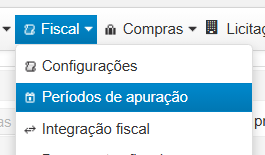
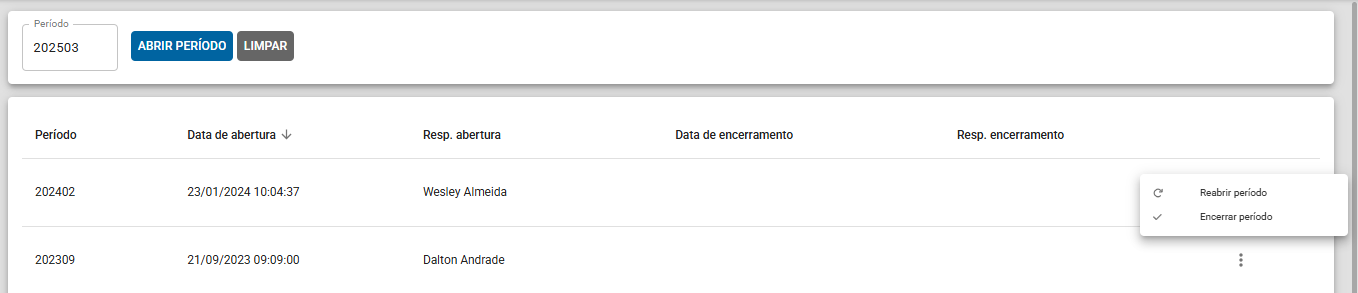
<span style="font-size: 11pt; font-family: Arial,sans-serif; color: #000000; background-color: transparent; font-weight: 400; font-style: normal; font-variant: normal; text-decoration: none; vertical-align: baseline; white-space: pre-wrap;">Neste menu é possível abrir/encerrar, de acordo com sua necessidade, um período mensal/quinzenal/semanal. Esta etapa é importante para que seja possível a organização dos seus documentos fiscais. </span>

[![image-1733947245941.png](https://wiki.v2saude.com.br/uploads/images/gallery/2024-12/scaled-1680-/image-1733947245941.png)](https://wiki.v2saude.com.br/uploads/images/gallery/2024-12/image-1733947245941.png)

[![image-1733947272729.png](https://wiki.v2saude.com.br/uploads/images/gallery/2024-12/scaled-1680-/image-1733947272729.png)](https://wiki.v2saude.com.br/uploads/images/gallery/2024-12/image-1733947272729.png)  
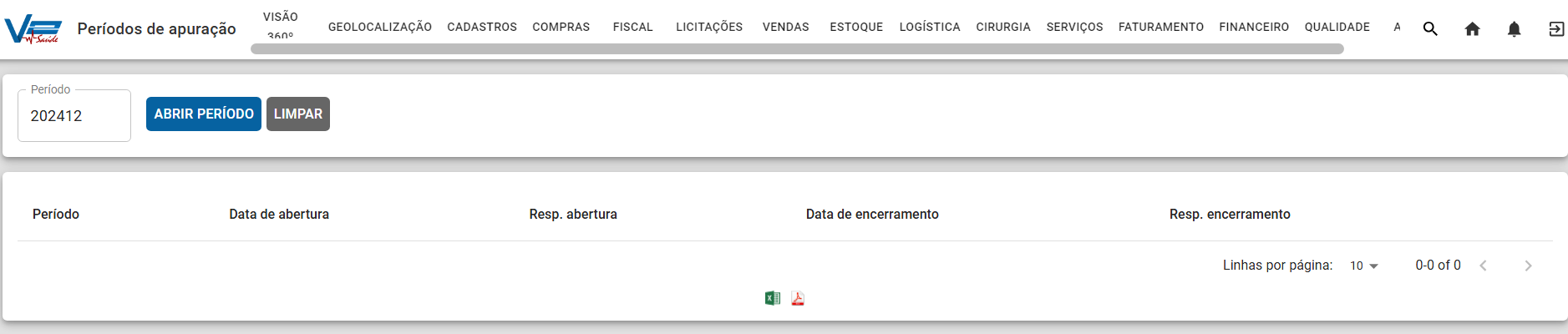
  
Observação: É possível reabrir um período que já foi encerrado anteriormente, clique nos 3 pontos &gt; "Reabrir período".

[![image-1741895689831.png](https://wiki.v2saude.com.br/uploads/images/gallery/2025-03/scaled-1680-/image-1741895689831.png)](https://wiki.v2saude.com.br/uploads/images/gallery/2025-03/image-1741895689831.png)

# Integração fiscal


# Integração fiscal

<span style="font-size: 11pt; font-family: Arial,sans-serif; color: #000000; background-color: transparent; font-weight: 400; font-style: normal; font-variant: normal; text-decoration: none; vertical-align: baseline; white-space: pre-wrap;">Nesta categoria é possível alterar CFOP, CST e ICMS e filtrar as informações para melhor localização e visualização. Nas Opções você pode verificar os itens das Notas Fiscais para alterar tributação, integrar documento no período de apuração e excluir essa integração também.</span>

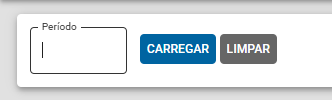
<span style="font-size: 11pt; font-family: Arial,sans-serif; color: #000000; background-color: transparent; font-weight: 400; font-style: normal; font-variant: normal; text-decoration: none; vertical-align: baseline; white-space: pre-wrap;">Nesse modal deve-se selecionar o período que será realizado a integração.  
  
</span>

[![image-1741895077553.png](https://wiki.v2saude.com.br/uploads/images/gallery/2025-03/scaled-1680-/image-1741895077553.png)](https://wiki.v2saude.com.br/uploads/images/gallery/2025-03/image-1741895077553.png)

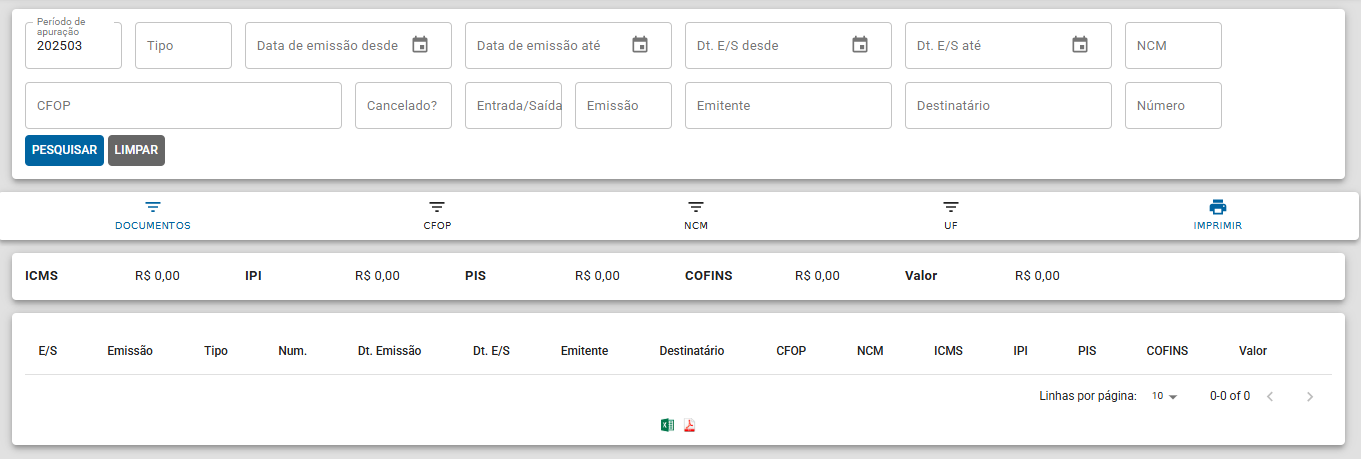
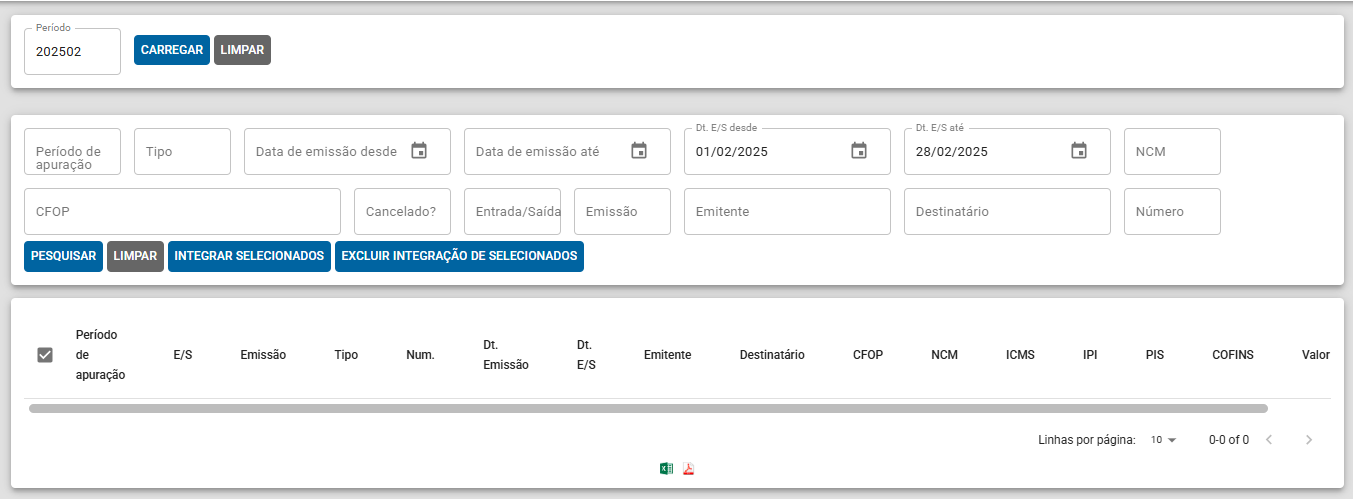
Ao selecionar o período, será exibido um novo modal para a realização da pesquisa das notas fiscais. Nesse modal, basta selecionar as notas desejadas e clicar na opção "Integrar Selecionados".

[![image-1741895199021.png](https://wiki.v2saude.com.br/uploads/images/gallery/2025-03/scaled-1680-/image-1741895199021.png)](https://wiki.v2saude.com.br/uploads/images/gallery/2025-03/image-1741895199021.png)
# Documentos fiscais


# Documentos fiscais

<span style="font-size: 11pt; font-family: Arial,sans-serif; color: #000000; background-color: transparent; font-weight: 400; font-style: normal; font-variant: normal; text-decoration: none; vertical-align: baseline; white-space: pre-wrap;">Facilitando a organização e visualização dos documentos emitidos, o esse submenu tem a proposta de otimizar a observação dos tributos a serem pagos, edição dos valores e categorização das NF.  
  
</span>

[![image-1741894584038.png](https://wiki.v2saude.com.br/uploads/images/gallery/2025-03/scaled-1680-/image-1741894584038.png)](https://wiki.v2saude.com.br/uploads/images/gallery/2025-03/image-1741894584038.png)

# Apuração de ICMS


# Apuração ICMS próprio

<span style="font-weight: 400;">Esta funcionalidade tem como objetivo o cálculo de valores a pagar e receber, além de possibilitar fazer o ajuste de categorias como crédito e débito. </span>

[![image-1698859284444.png](https://wiki.v2saude.com.br/uploads/images/gallery/2023-11/scaled-1680-/image-1698859284444.png)](https://wiki.v2saude.com.br/uploads/images/gallery/2023-11/image-1698859284444.png)

# Débitos DIFAL


# Débitos DIFAL

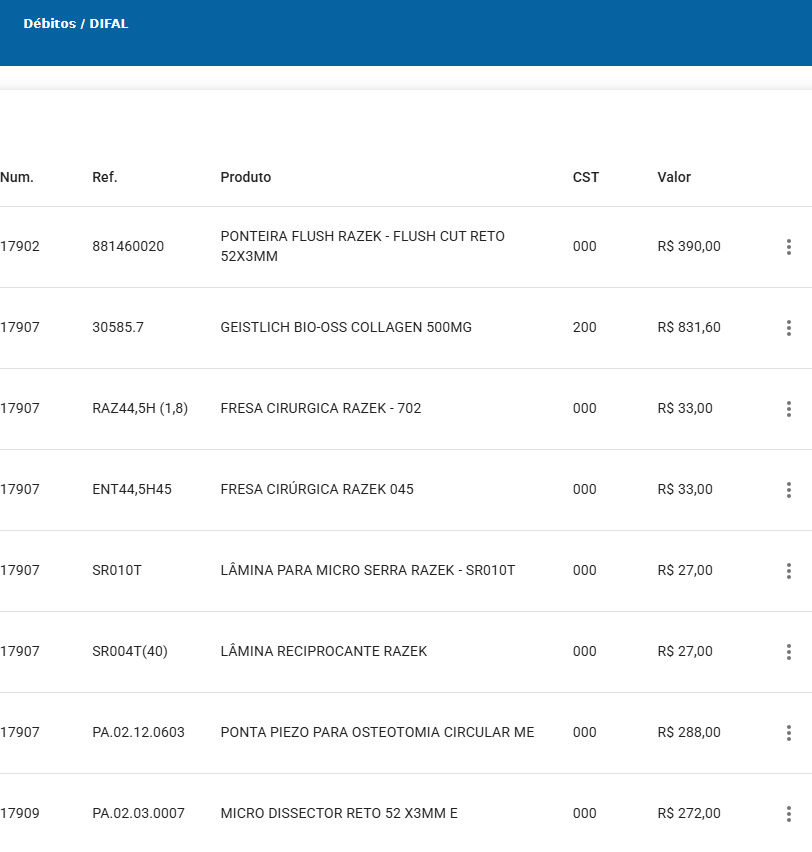
<span style="font-size: 15px;">Ao emitir uma nota fiscal para fora do Estado, o módulo fiscal relata detalhadamente os produtos, valores e notas que destacam Difal</span>

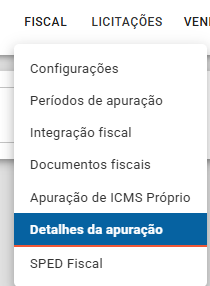
Menu fiscal&gt; Detalhes da Apuração

**[![image-1746025878727.png](https://wiki.v2saude.com.br/uploads/images/gallery/2025-04/scaled-1680-/image-1746025878727.png)](https://wiki.v2saude.com.br/uploads/images/gallery/2025-04/image-1746025878727.png)**

**Selecione o Período Fiscal e o tipo de detalhe**

**[![image-1746025982765.png](https://wiki.v2saude.com.br/uploads/images/gallery/2025-04/scaled-1680-/image-1746025982765.png)](https://wiki.v2saude.com.br/uploads/images/gallery/2025-04/image-1746025982765.png)**

**Detalhando por item.**

**[![image-1746026010171.png](https://wiki.v2saude.com.br/uploads/images/gallery/2025-04/scaled-1680-/image-1746026010171.png)](https://wiki.v2saude.com.br/uploads/images/gallery/2025-04/image-1746026010171.png)**

**[![image-1746026030762.png](https://wiki.v2saude.com.br/uploads/images/gallery/2025-04/scaled-1680-/image-1746026030762.png)](https://wiki.v2saude.com.br/uploads/images/gallery/2025-04/image-1746026030762.png)**
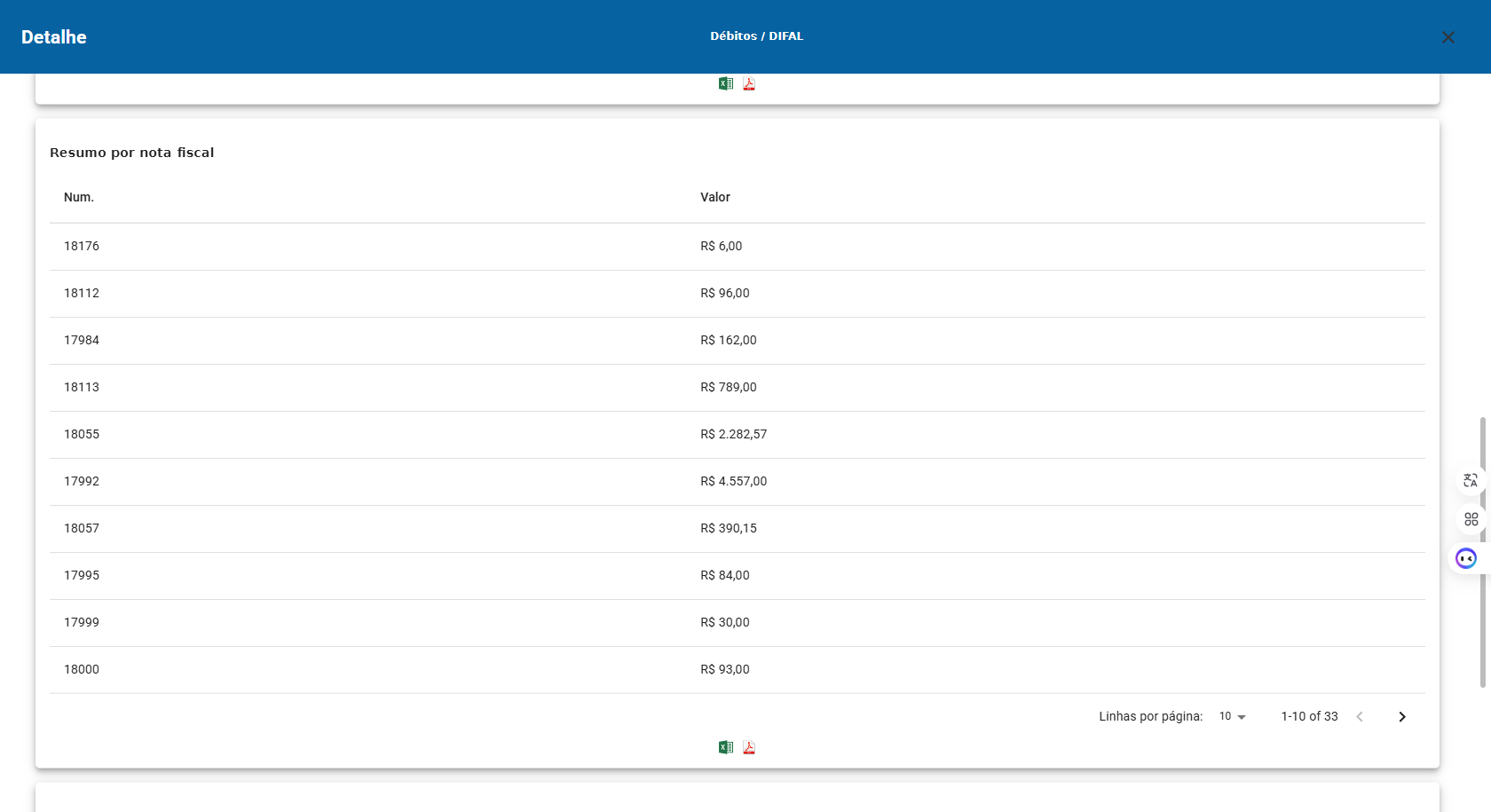
**Por NF-e emitida:**

[![image-1746026078530.png](https://wiki.v2saude.com.br/uploads/images/gallery/2025-04/scaled-1680-/image-1746026078530.png)](https://wiki.v2saude.com.br/uploads/images/gallery/2025-04/image-1746026078530.png)
**Por UF**

[![image-1746026180467.png](https://wiki.v2saude.com.br/uploads/images/gallery/2025-04/scaled-1680-/image-1746026180467.png)](https://wiki.v2saude.com.br/uploads/images/gallery/2025-04/image-1746026180467.png)
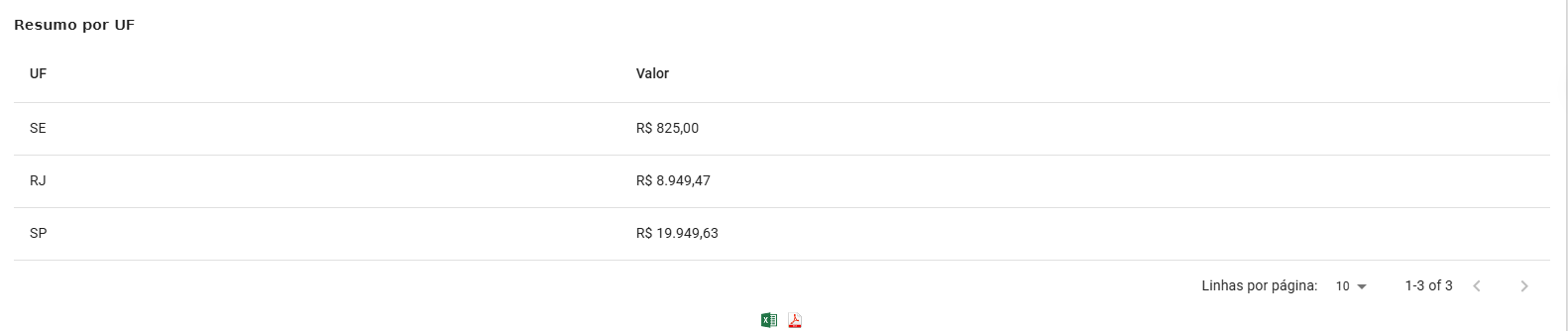
Lembrando que esses relatórios podem ser gerados em pdf ou excel, clicando nos icones.

 [![image-1746027012671.png](https://wiki.v2saude.com.br/uploads/images/gallery/2025-04/scaled-1680-/image-1746027012671.png)](https://wiki.v2saude.com.br/uploads/images/gallery/2025-04/image-1746027012671.png)

# Cálculo do Difal Base única e Base dupla

A ***base única*** é utilizada principalmente quando o destinatário não é contribuinte do ICMS. Este cálculo é mais simples onde é utilizado a fórmula: **Difal = Valor da operação x (Alíquota interna - Alíquota interestadual)  
  
Por exemplo**:   
  
**Valor da operação**: 1.000,00; **Alíquota interna**: 0,18; **Alíquota interestadual**: 0,12;  
  
**Difal** = 1000 x (0,18 - 0,12)  
**Difal** = 1000 x 0,06  
**Difal** = R$ 60,00

O ICMS ***de base dupla*** possuí um cálculo um pouco mais complexo, mas abaixo apresenta uma representação de como o mesmo pode ser realizado para validação dessas informações, se necessário.  
  
**Exemplo:**

**Base ICMS próprio** / (1 - **Alíquota ICMS destino** + **FCP**) \* 1 - **Alíquota de redução** / 1  
**Base ICMS próprio** 10.000,00  
1 - **Alíquota ICMS destino** (1-18%) 0,82  
**Vlr s**/ **ICMS da NF destacado** 8.800,00  
**Alíquota de redução** /1 0,82\*1  
**Total / Alíquota** 10.731,71  
**ICMS UF destinatário** 18% 1.931,71  
**ICMS UF na NF-e** 12% 1.200,00  
**Total** = 731,71

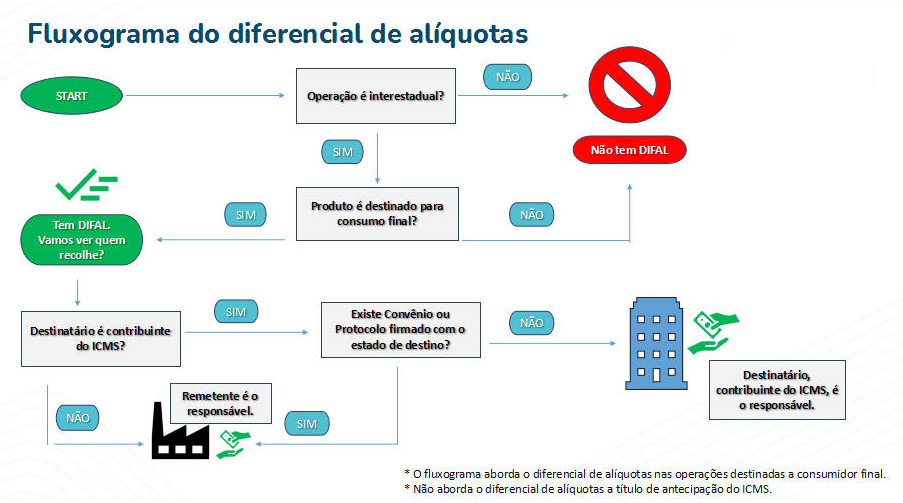
**Observação:** Abaixo é mostrado o **Fluxograma do diferencial de alíquotas**

[![image-1744650076982.png](https://wiki.v2saude.com.br/uploads/images/gallery/2025-04/scaled-1680-/image-1744650076982.png)](https://wiki.v2saude.com.br/uploads/images/gallery/2025-04/image-1744650076982.png)
# SPED Fiscal


# Arquivo SPED

<span style="font-size: 15px;">Este submenu tem como objetivo configurar o arquivo para otimizar ajustes de impostos/isenções. Anteriormente os ajustes só podiam ser feitos via PVA, mas com nosso módulo Fiscal os ajustes são mais rápidos e fáceis. </span>

[![image-1698859507497.png](https://wiki.v2saude.com.br/uploads/images/gallery/2023-11/scaled-1680-/image-1698859507497.png)](https://wiki.v2saude.com.br/uploads/images/gallery/2023-11/image-1698859507497.png)

\-----------------

#### **<span style="color: #1d1c1d; font-family: Slack-Lato, Slack-Fractions, appleLogo, sans-serif; font-size: 15px; font-style: normal; font-variant-ligatures: common-ligatures; font-variant-caps: normal; letter-spacing: normal; text-align: left; text-indent: 0px; text-transform: none; word-spacing: 0px; -webkit-text-stroke-width: 0px; white-space: normal; text-decoration-thickness: initial; text-decoration-style: initial; text-decoration-color: initial; display: inline !important; float: none;">Incluir informação das mercadorias nas notas emitidas</span>**

ATENÇÃO! Conforme item 4.1.1 do Ato COTEPE/ICMS nº 09, de 18 de abril de 2008, os materiais **não** saem com a descrição no arquivo SPED, de acordo com a base legal:  
Notas Fiscais Eletrônicas - NF-e de emissão própria: regra geral, devem ser apresentados somente os registros C100 e C190, e, se existirem ajustes de documento fiscais determinados por legislação estadual (tabela 5.3 do Ato COTEPE ICMS 09/08), devem ser apresentados também os registros C195 e C197; somente será admitida a informação do registro C170 quando também houver sido informado o registro C176, hipótese de emissão de documento fiscal quando houver direito a Ressarcimento de ICMS em Operações com Substituição Tributária; permitindo ainda a partir de julho de 2012, a apresentação dos registros C110 e C120.

# SPED Contribuições PIS/COFINS

<span style="font-size: 12pt; font-family: Arial,sans-serif; color: #000000; background-color: transparent; font-weight: 400; font-style: normal; font-variant: normal; text-decoration: none; vertical-align: baseline; white-space: pre-wrap;">Financeiro &gt; Arquivos Sped</span>

<span style="font-size: 12pt; font-family: Arial,sans-serif; color: #000000; background-color: transparent; font-weight: 400; font-style: normal; font-variant: normal; text-decoration: none; vertical-align: baseline; white-space: pre-wrap;"><span style="border: none; display: inline-block; overflow: hidden; width: 258px; height: 435px;">![](https://lh7-rt.googleusercontent.com/docsz/AD_4nXeupfmwipXNWSTOA_Oja1nZsFN-QdwI5LrdMyUbs1n6TM7E68C-u5EV7DNtcDitymHsoziTNqy-A062sJCQlB0JqRD-mMhvZ_luaHl2czZX8xwBDvA9IiUPY03BKbjT-ki7mHNG?key=yMqd7M8W6Fwpjve4pRKT2uRC)  
  
</span></span>

<span style="font-size: 12pt; font-family: Arial,sans-serif; color: #000000; background-color: transparent; font-weight: 400; font-style: normal; font-variant: normal; text-decoration: none; vertical-align: baseline; white-space: pre-wrap;">  
Ao acessar o menu, é possível identificar os arquivos disponíveis para download. Para prosseguir, clique nos três pontos e selecione a opção "Download".</span>

<span style="font-size: 12pt; font-family: Arial,sans-serif; color: #000000; background-color: transparent; font-weight: 400; font-style: normal; font-variant: normal; text-decoration: none; vertical-align: baseline; white-space: pre-wrap;">Você pode solicitar um novo arquivo a partir do botão “</span><span style="font-size: 12pt; font-family: Arial,sans-serif; color: #000000; background-color: transparent; font-weight: bold; font-style: normal; font-variant: normal; text-decoration: none; vertical-align: baseline; white-space: pre-wrap;">Solicitar novo arquivo</span><span style="font-size: 12pt; font-family: Arial,sans-serif; color: #000000; background-color: transparent; font-weight: 400; font-style: normal; font-variant: normal; text-decoration: none; vertical-align: baseline; white-space: pre-wrap;">”  
  
</span>

<span style="font-size: 12pt; font-family: Arial,sans-serif; color: #000000; background-color: transparent; font-weight: 400; font-style: normal; font-variant: normal; text-decoration: none; vertical-align: baseline; white-space: pre-wrap;"><span style="border: none; display: inline-block; overflow: hidden; width: 602px; height: 93px;">![](https://lh7-rt.googleusercontent.com/docsz/AD_4nXd9LR7kWspO8ryTefVY9GmDtU_VOvBq8ZIjsPVDEuMgUqAbjDioDxNS6n0hufwrmfB82yl23nVuMCfZnscCpHX08pRjv7r1YwvLtSSf81nKulcp6bzO6nbY5y30CT73INC_4CbeCQ?key=yMqd7M8W6Fwpjve4pRKT2uRC)</span></span>

<span style="font-size: 12pt; font-family: Arial,sans-serif; color: #000000; background-color: transparent; font-weight: 400; font-style: normal; font-variant: normal; text-decoration: none; vertical-align: baseline; white-space: pre-wrap;">Ao clicar no botão, será exibida a seguinte tela:</span>

<span style="font-size: 12pt; font-family: Arial,sans-serif; color: #000000; background-color: transparent; font-weight: 400; font-style: normal; font-variant: normal; text-decoration: none; vertical-align: baseline; white-space: pre-wrap;">  
</span><span style="font-size: 12pt; font-family: Arial,sans-serif; color: #000000; background-color: transparent; font-weight: 400; font-style: normal; font-variant: normal; text-decoration: none; vertical-align: baseline; white-space: pre-wrap;"><span style="border: none; display: inline-block; overflow: hidden; width: 602px; height: 116px;">![](https://lh7-rt.googleusercontent.com/docsz/AD_4nXeciB7YtCO9haLK2F3odrtsFXzSgImtNXJdkSlRub9lfj-pG9RMFochkIl_q5wreSXmneLkndMqtlB-6Nb4TmMhpys5gJaONB3B18osf-lLd3Fh1oStpOfH_OoujX2ty9f78daByQ?key=yMqd7M8W6Fwpjve4pRKT2uRC)</span></span>

<span style="font-size: 12pt; font-family: Arial,sans-serif; color: #000000; background-color: transparent; font-weight: 400; font-style: normal; font-variant: normal; text-decoration: none; vertical-align: baseline; white-space: pre-wrap;">Pode se definir o campo “</span><span style="font-size: 12pt; font-family: Arial,sans-serif; color: #000000; background-color: transparent; font-weight: bold; font-style: normal; font-variant: normal; text-decoration: none; vertical-align: baseline; white-space: pre-wrap;">Tipo”</span><span style="font-size: 12pt; font-family: Arial,sans-serif; color: #000000; background-color: transparent; font-weight: 400; font-style: normal; font-variant: normal; text-decoration: none; vertical-align: baseline; white-space: pre-wrap;"> para solicitar o </span><span style="font-size: 12pt; font-family: Arial,sans-serif; color: #000000; background-color: transparent; font-weight: bold; font-style: normal; font-variant: normal; text-decoration: none; vertical-align: baseline; white-space: pre-wrap;">SPED fiscal ICMS/IPI</span><span style="font-size: 12pt; font-family: Arial,sans-serif; color: #000000; background-color: transparent; font-weight: 400; font-style: normal; font-variant: normal; text-decoration: none; vertical-align: baseline; white-space: pre-wrap;"> ou </span><span style="font-size: 12pt; font-family: Arial,sans-serif; color: #000000; background-color: transparent; font-weight: bold; font-style: normal; font-variant: normal; text-decoration: none; vertical-align: baseline; white-space: pre-wrap;">SPED Contribuições PIS/COFINS</span>

<span style="font-size: 12pt; font-family: Arial,sans-serif; color: #000000; background-color: transparent; font-weight: bold; font-style: normal; font-variant: normal; text-decoration: none; vertical-align: baseline; white-space: pre-wrap;"><span style="border: none; display: inline-block; overflow: hidden; width: 318px; height: 390px;">![](https://lh7-rt.googleusercontent.com/docsz/AD_4nXfhjrzHdIwsirr-TvBQWemjJNJps129msU0jao-UCVr-XEQ-4vV2mn7nFTTFAHyiCcmReY4zPBYSz96vS1U4YmOIskHSaT87SWOooqSXVfhZbclVn9gZV_la4oCTFOdue3MJ_dBig?key=yMqd7M8W6Fwpjve4pRKT2uRC)</span></span>

<span style="font-size: 12pt; font-family: Arial,sans-serif; color: #000000; background-color: transparent; font-weight: 400; font-style: normal; font-variant: normal; text-decoration: none; vertical-align: baseline; white-space: pre-wrap;">Pode-se definir</span><span style="font-size: 12pt; font-family: Arial,sans-serif; color: #000000; background-color: transparent; font-weight: bold; font-style: normal; font-variant: normal; text-decoration: none; vertical-align: baseline; white-space: pre-wrap;"> </span><span style="font-size: 12pt; font-family: Arial,sans-serif; color: #000000; background-color: transparent; font-weight: 400; font-style: normal; font-variant: normal; text-decoration: none; vertical-align: baseline; white-space: pre-wrap;">o</span><span style="font-size: 12pt; font-family: Arial,sans-serif; color: #000000; background-color: transparent; font-weight: bold; font-style: normal; font-variant: normal; text-decoration: none; vertical-align: baseline; white-space: pre-wrap;"> Perfil de enquadramento</span><span style="font-size: 12pt; font-family: Arial,sans-serif; color: #000000; background-color: transparent; font-weight: bold; font-style: normal; font-variant: normal; text-decoration: none; vertical-align: baseline; white-space: pre-wrap;">  
</span><span style="font-size: 12pt; font-family: Arial,sans-serif; color: #000000; background-color: transparent; font-weight: bold; font-style: normal; font-variant: normal; text-decoration: none; vertical-align: baseline; white-space: pre-wrap;">  
</span><span style="font-size: 12pt; font-family: Arial,sans-serif; color: #000000; background-color: transparent; font-weight: bold; font-style: normal; font-variant: normal; text-decoration: none; vertical-align: baseline; white-space: pre-wrap;">A - Registros de forma detalhada</span><span style="font-size: 12pt; font-family: Arial,sans-serif; color: #000000; background-color: transparent; font-weight: bold; font-style: normal; font-variant: normal; text-decoration: none; vertical-align: baseline; white-space: pre-wrap;">  
</span><span style="font-size: 12pt; font-family: Arial,sans-serif; color: #000000; background-color: transparent; font-weight: bold; font-style: normal; font-variant: normal; text-decoration: none; vertical-align: baseline; white-space: pre-wrap;">B - Registro de forma sintética</span><span style="font-size: 12pt; font-family: Arial,sans-serif; color: #000000; background-color: transparent; font-weight: bold; font-style: normal; font-variant: normal; text-decoration: none; vertical-align: baseline; white-space: pre-wrap;">  
</span><span style="font-size: 12pt; font-family: Arial,sans-serif; color: #000000; background-color: transparent; font-weight: bold; font-style: normal; font-variant: normal; text-decoration: none; vertical-align: baseline; white-space: pre-wrap;">C - Escrituração simplificada</span>

<span style="font-size: 12pt; font-family: Arial,sans-serif; color: #000000; background-color: transparent; font-weight: 400; font-style: normal; font-variant: normal; text-decoration: none; vertical-align: baseline; white-space: pre-wrap;"><span style="border: none; display: inline-block; overflow: hidden; width: 301px; height: 366px;">![](https://lh7-rt.googleusercontent.com/docsz/AD_4nXeundK7GfRZkAWdiakmnFquNkwCBve2r5mQvflqABEdCUwPgonKDrUx5ulbhviBH5wK1bLmV_j09hyS_RP8j9jrwbSPAwrTchHPePe5BvZtYCVIwvipoLxAYJ33Tn6OpaPjBpzymQ?key=yMqd7M8W6Fwpjve4pRKT2uRC)</span></span>

<span style="font-size: 12pt; font-family: Arial,sans-serif; color: #000000; background-color: transparent; font-weight: 400; font-style: normal; font-variant: normal; text-decoration: none; vertical-align: baseline; white-space: pre-wrap;">É possível gerar um </span><span style="font-size: 12pt; font-family: Arial,sans-serif; color: #000000; background-color: transparent; font-weight: bold; font-style: normal; font-variant: normal; text-decoration: none; vertical-align: baseline; white-space: pre-wrap;">Bloco K</span>

<span style="font-size: 12pt; font-family: Arial,sans-serif; color: #000000; background-color: transparent; font-weight: 400; font-style: normal; font-variant: normal; text-decoration: none; vertical-align: baseline; white-space: pre-wrap;"><span style="border: none; display: inline-block; overflow: hidden; width: 602px; height: 169px;">![](https://lh7-rt.googleusercontent.com/docsz/AD_4nXcSYCZ6vzYRsx-KgSFijqNpE4OQ92sXmH8ZQu4LrseXXp53WhxCDCp7K2uhT3p8kOHWKZdyG7q0-yEYeWLzfwvQ6EiSY0zQEt4HmK3d56oaD3I_J07Vs-GWpPA5cG__CnlOKPlQ?key=yMqd7M8W6Fwpjve4pRKT2uRC)</span></span>

<span style="font-size: 12pt; font-family: Arial,sans-serif; color: #000000; background-color: transparent; font-weight: bold; font-style: normal; font-variant: normal; text-decoration: none; vertical-align: baseline; white-space: pre-wrap;">Gerar um registro de inventário (Bloco H)</span><span style="font-size: 12pt; font-family: Arial,sans-serif; color: #000000; background-color: transparent; font-weight: 400; font-style: normal; font-variant: normal; text-decoration: none; vertical-align: baseline; white-space: pre-wrap;">, sendo ele selecionado é </span><span style="font-size: 12pt; font-family: Arial,sans-serif; color: #000000; background-color: transparent; font-weight: bold; font-style: normal; font-variant: normal; text-decoration: none; vertical-align: baseline; white-space: pre-wrap;">possível Incluir estoque em posse de terceiros</span><span style="font-size: 12pt; font-family: Arial,sans-serif; color: #000000; background-color: transparent; font-weight: 400; font-style: normal; font-variant: normal; text-decoration: none; vertical-align: baseline; white-space: pre-wrap;"> e </span><span style="font-size: 12pt; font-family: Arial,sans-serif; color: #000000; background-color: transparent; font-weight: bold; font-style: normal; font-variant: normal; text-decoration: none; vertical-align: baseline; white-space: pre-wrap;">Definir data de inventário</span>

<span style="font-size: 12pt; font-family: Arial,sans-serif; color: #000000; background-color: transparent; font-weight: 400; font-style: normal; font-variant: normal; text-decoration: none; vertical-align: baseline; white-space: pre-wrap;"><span style="border: none; display: inline-block; overflow: hidden; width: 602px; height: 137px;">![](https://lh7-rt.googleusercontent.com/docsz/AD_4nXcufN_jMfQtcuWI9miBNp1bqj7u9R8BNAucf3zwp40SjeRrSd6vW3RIOxwRW_6Fd0VgQ6GG0qwRPmL3tXYYPrb_IIGThmpoKXNohzE5MMhZCo7ZNT5-Ht-_ClGklVftJkl0a1sd?key=yMqd7M8W6Fwpjve4pRKT2uRC)</span></span>

<span style="font-weight: normal;">  
</span>

<span style="font-size: 12pt; font-family: Arial,sans-serif; color: #000000; background-color: transparent; font-weight: 400; font-style: normal; font-variant: normal; text-decoration: none; vertical-align: baseline; white-space: pre-wrap;">Feito a configuração, basta clicar em </span><span style="font-size: 12pt; font-family: Arial,sans-serif; color: #000000; background-color: transparent; font-weight: bold; font-style: normal; font-variant: normal; text-decoration: none; vertical-align: baseline; white-space: pre-wrap;">Salvar</span># SPED - Bloco H

Quando o SPED é gerado ele não sai com o Bloco H, para que o Bloco H seja incluído no arquivo SPED, é fundamental que ele seja selecionado no momento da solicitação. Caso contrário, suas informações não constarão no arquivo. Ao marcar o Bloco H como "SIM", também é possível incluir os dados de estoque de terceiros e itens pendentes de faturamento.

[![image-1748971919168.png](https://wiki.v2saude.com.br/uploads/images/gallery/2025-06/scaled-1680-/image-1748971919168.png)](https://wiki.v2saude.com.br/uploads/images/gallery/2025-06/image-1748971919168.png)# SPED - Bloco K

#### <span data-contrast="none">Bloco K e suas principais características:</span>  


##### **<span data-contrast="none">Objetivo</span>**<span data-contrast="none">:</span><span data-ccp-props="{"134233117":false,"134233118":false,"201341983":0,"335551550":0,"335551620":0,"335557856":16777215,"335559685":225,"335559737":225,"335559738":0,"335559739":0,"335559740":300}">   
</span>

1. Controlar a produção e o estoque de mercadorias e insumos.<span data-ccp-props="{"134233117":false,"134233118":false,"201341983":0,"335551550":0,"335551620":0,"335557856":16777215,"335559685":225,"335559737":225,"335559738":0,"335559739":0,"335559740":300}">   
    </span>
2. Fornecer informações detalhadas sobre a movimentação de produtos.

##### <span data-ccp-props="{"134233117":false,"134233118":false,"201341983":0,"335551550":0,"335551620":0,"335557856":16777215,"335559685":225,"335559737":225,"335559738":0,"335559739":0,"335559740":300}"> </span>**<span data-contrast="none">Informações Contidas</span>**<span data-contrast="none">:</span><span data-ccp-props="{"134233117":false,"134233118":false,"201341983":0,"335551550":0,"335551620":0,"335557856":16777215,"335559685":225,"335559737":225,"335559738":0,"335559739":0,"335559740":300}"> </span>

1. <span data-contrast="none">Dados de produção (quantidade produzida, insumos utilizados).</span><span data-ccp-props="{"134233117":false,"134233118":false,"201341983":0,"335551550":0,"335551620":0,"335557856":16777215,"335559685":225,"335559737":225,"335559738":0,"335559739":0,"335559740":300}"> </span>
2. <span data-contrast="none">Estoque inicial e final de produtos acabados e em processo.</span><span data-ccp-props="{"134233117":false,"134233118":false,"201341983":0,"335551550":0,"335551620":0,"335557856":16777215,"335559685":225,"335559737":225,"335559738":0,"335559739":0,"335559740":300}"> </span>
3. <span data-contrast="none">Movimentação de entradas e saídas de produtos.</span><span data-ccp-props="{"134233117":false,"134233118":false,"201341983":0,"335551550":0,"335551620":0,"335557856":16777215,"335559685":225,"335559737":225,"335559738":0,"335559739":0,"335559740":300}"> </span>